Online 193.192.59.248:28000 checked 8m ago
tespoom
Connect
srv = rust.server("193.192.59.248:28015")
print(srv.connect_command)Right now
srv.summary()Players
srv.players.plot(range="48h")Every five minutes, from the Steam server list.
Hourly average and peak, UTC.
Daily average and peak, UTC.
Server performance
srv.performance.plot(measure="fps", range="48h")48 hours: hourly readings. 30 to 90 days: one point a day, with the day's average and lowest fps, most entities and most memory, measured since 17 Sep. From asking the server directly; low fps and a climbing entity count mean lag.
Rank · daily · 1 is best
srv.rank.plot(invert=True) # 1 is bestTop 68% of all ranked servers. Ranked on player hours over the last seven days.
Wipe schedule · force wipes only
srv.wipe_schedule()Next wipe Thursday 5 November, 19:00 UTC, in 7d 7h. # The force wipe · high confidence
Coming wipes
| in | at | kind | |
|---|---|---|---|
| 0 | 7d 7h | Thu 5 Nov, 19:00 UTC | FW force wipe |
| 1 | 35d 7h | Thu 3 Dec, 19:00 UTC | FW force wipe |
The first 48 hours of its last wipes
Players each hour, from the hour of the wipe. The latest peaked at 0, 0 hours in.
Wipes · newest first
srv.wipes.head(20)| wiped | peak | crowd | lasted | players_before | |
|---|---|---|---|---|---|
| 0 | Thu 1 Oct, 18:38 UTC FW27d ago | 0 | NaN | running | 0 |
# Peak: the most players in the first 48 hours. Crowd: whether every day of the wipe kept at least half that peak, or the day it fell below. A new world less than six hours after a wipe is a restart, not a wipe of its own.
display(srv.map, srv.info())Map
4000 · seed 1101504968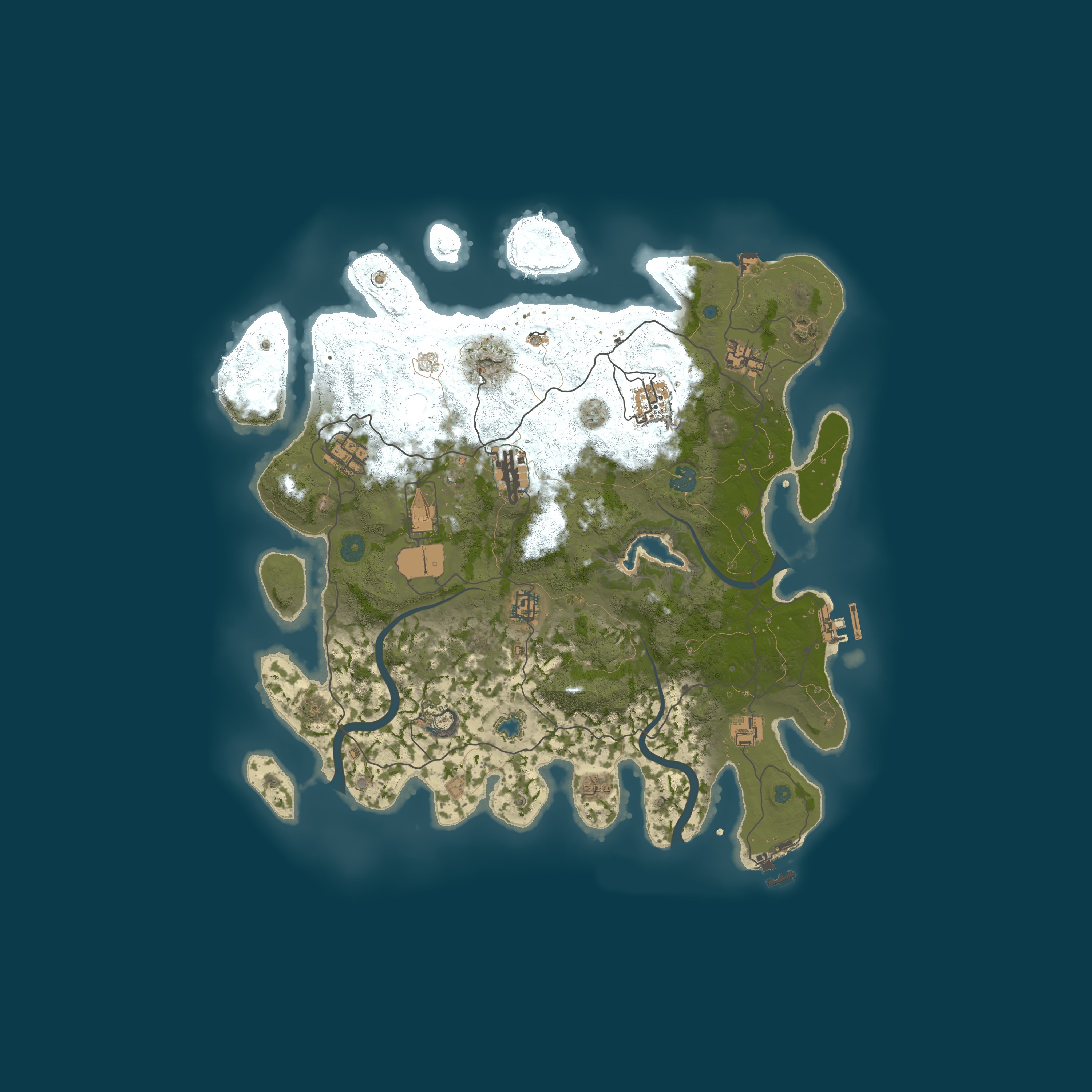
- map
- Procedural Map
- size
- 4000
- seed
- 1101504968
Server
srv.info()- address
- 193.192.59.248:28000
- region
- –
- max players
- 50
- group limit
- 8, the default
- wipe schedule
- –
- last wipe
- 1 Oct 2026, 18:38 UTC
- hostname
- –
- first seen
- 13 Sep 2026
Similar servers · the same kind of game, then region, group limit, rate and wipes
rust.similar(srv).head(6)| server | like_this | players | |
|---|---|---|---|
| 0 | Rusty Moose |EU Mondays| | EU · groups of 12+ · weekly · 516 on average | 453/475 |
| 1 | Rustoria.co - EU East Long | EU · groups of 12+ · monthly · 319 on average | 376/375 |
| 2 | Rusty Moose |EU Main| | EU · groups of 12+ · weekly · 291 on average | 48/250 |
| 3 | Rustoria.co - EU Main | EU · groups of 16+ · weekly · 276 on average | 32/250 |
| 4 | Rustafied.com - EU Friday | EU · groups of 16+ · weekly · 275 on average | 48/100 |
| 5 | Rustoria.co - EU East Medium | EU · groups of 12+ · biweekly · 243 on average | 149/200 |
Quick answers
From the figures on this page.
Population
What position does tespoom take in the server rankings?
Player hours over seven days put tespoom at #15,165, in the top 68% of the ranked set.
What population does tespoom carry?
The sample now reads 0 players for tespoom, out of 50 slots. Over the last seven days it averaged 0 players and peaked at 1.
Server facts
How smoothly does tespoom run?
The 48-hour average is 8 server fps, with a low of 4. The entity count peaked at 84,694, covering buildings, deployables and the rest of the world. Memory peaked at 2,970 MB. Lag, as players feel it, comes from an entity count that climbs and fps that falls.
What is the Rust version on tespoom?
The build is Rust network protocol 2635 and build 168909 on Windows, run by tespoom. The protocol has to match before you can join, and Steam does the updating.
Is tespoom up, and what does its uptime show?
The current sample puts tespoom online. The uptime it reports puts the last restart about 6 days 15 hours ago. 167 of 168 hours up over the last 7 full days, or 99%. Its earliest recorded date in Rust Data is 13 September 2026.
In which location is tespoom hosted?
No region is published by tespoom. Where a server says it is, that is what Rust Data shows; the machine's actual location is not looked up. 193.192.59.248:28000 is its address.
Settings and map
What rules and settings are recorded for tespoom?
You will not find a gather rate in the string tespoom. Eight players per group: that is the game's default, and it applies here. survival is the game mode here, and the usual game, with gathering, building and raiding. Combat and raiding between players: both allowed. Community is its browser category. Joining requires Rust's premium status. VAC is running: Valve's anti-cheat is on.
Which map has tespoom selected?
Size 4,000, seed 1101504968: the procedural map on tespoom, generated by the game. The same size and seed produce the same map; this page links to RustMaps so it can be viewed.
Wipe data
When does tespoom wipe, and how often?
A single wipe each month, the force wipe, is all tespoom does. Every Rust server wipes at the force wipe on Thursday 5 November at 19:00 UTC, which is its next wipe. This world was created 27 days 16 hours ago.
What is wipe day on tespoom like?
Across recent wipes the busiest point averaged 0 players. Peak population on the latest wipe came 0 hours in.
Tags and filters
Which Rust Data filters and lists contain tespoom?
On Rust Data, tespoom appears in these lists: Rust community servers, unfiltered. These filters bring it up on the server list: Type: Community (not modded, not official) and No plugins at all; Game mode: Premium; Server tag: Premium ^q; Group limit: 5 or more.
How should you read the server tags on tespoom?
Read by the game's server browser, the tags tespoom publishes are: gmvanilla (Game mode): Game mode: vanilla survival; mp50 (Max players): The server lists 50 slots; ts8 (Group limit): Team limit of 8, as shipped by default; v2635 (Protocol): Protocol 2635 is required; a different game version cannot connect; cs168909 (Build): The server runs build 168909; ptrak (Networking): The network layer is RakNet, standard for the game; $r? (Region code): No region code is set; ^q (Premium): Joining requires Rust's premium status. The tags also hold the current player count, the queue and when the world was made; these appear at the top of this page.
Join steps
What is the way to join tespoom?
Enter client.connect 193.192.59.248:28000 in the console (F1 in Rust). Or press Launch Rust here, which opens Rust through Steam and makes the connection. Joining requires Rust's premium status.